
Little Ashton - House Generator
- Apr 18
- 16 min read
Updated: Jul 31

Introduction
Hello this post is split into multiple pieces due to the project developing quite a bit in narrative design. To see the most recent development click to jump here, to start from the beginning read down below.
Originally this project was structured to work on Victorian style buildings, inspired by cottages in Atomfall. It still uses Houdini and the same logic to create buildings however is more suited to my real-time games environment Little Ashton, a 1960s playable mining town.
Currently a work in progress.
Project Outline and Inspirations

The goals of this project are to get better at constructing buildings procedurally and build a good modular kit along the way. I’m quite inspired by Atomfall as after playing through the game I felt very nostalgic of summer trips to the Peak District and the lovely British cottage side (minus the radiation and ferals).

It’s also a great excuse to gather more reference by popping out with the upcoming summer weather. I dove through my reference pictures from trips and settled on trying to create a good kit to create the slate rock buildings of Wetton Village. This village is close by to Thors Cave a fantastic hilltop cave that I visited last summer with my friends, it has stunning views and great country surrounding the village.
Let’s breakdown this projects goals:
Create a procedural building generate int the style of northern cottage buildings
Be able to randomise the building with seeds
Support a variety of building types – tavern, inn, pub or shop through a dropdown
Place windows and doors at specified spots using tagged assets
Link shaders to the tool to apply worn vertex painting and dynamically change colours
Optimise cost through LODS and instancing within Unreal Engine
Some stretch goals:
Spawn decals to apply staining and damage
Apply vertex painting to instancing for ruined wear
Spawn additional set dressing on top like lamps, window flower planter, signage or vines
Write documentation
The timeline is not fully determined for this project as the university term is starting again, I will be busy with teaching however I would like to wrap it up before the middle of May for the base stages and push it further later on (maybe interiors?). I’m also taking partial inspiration to the phenomenal building breakdowns Embark released a bit ago from their game Finales do check it out: https://www.sidefx.com/community/making-the-procedural-buildings-of-the-finals-using-houdini/
Modular Walls – Make and Place

I modelled my modular walls in 3DSMax and set their dimensions to be 250 height and 200 widths. I got these numbers through some trial and error of measuring various references of cottages and creating a master building blockout (based on Danescombe Cottage). I explored further sizes of shorter pieces, but this made putting them together very close and strange compared to my reference.

To start the placement, I created a box and isolated the bottom border. From this I resample the points to be every 200 and spawned my walls. To make them rotate properly I used the normal point value to force a different transform of the pieces. For randomising the pieces I used a attribute randomiser to set a value random between 0 and 2 for choosing either blank wall, door and window.
Fixing Broken Resampling

I did encounter however a problem that if the inserted box was not evenly divided for 200 by 250 it broke the placement resample. To resolve this I used a bounds node to recalculate the spawning box into a box that does fit the dimensions using a wrangle. This will also ensure any other procedural placement resample will fit as long as the modular pieces are modelled to be 200 by 250.
Vertex Shaders for Walls

I wanted to test if some randomised vertex painting values on the walls would work. The current generation is mesh based not instanced so what I did was randomly spawn sphere to create splashes of vertex wear data around the walls. This worked quite well however will need to be reworked once the HDA is packed to respond in UE with its instances. The current vertex paint uses red channel for wear of paint to the stone and green for dark moss wear around window and door frames.
Placing Roof and Shingles

To place the tiles on the roof I first tried to manually fix the normals for each direction however uncovered that its much easier to resample the existing roof borders. A normal breaking node I accidentally introduced was the point jitter as this has a toggle to overwrite the normals too which originally made all my shingles face upwards. I also changed the ridge tile to be rounded to better fit the shape language of my master painted cottage reference - Danescombe Cottage. For determining the spawn point I used the bounds of the top of the border to get the areas to begin calculating the roof. For spawning the chimneys I used existing lines but chose the last 2 points to spawn them in as they appear prominently on the ends of the house (I assume due to where a fireplace is located for kitchen and living area).
Automatic Storeys and Building Up

After spawning was working well manually, I knew I had to add a method to automatically detect how many stories high the cottage needed to build. To do this, I added some for-number loops and used my previous scale calculation to figure out how many stories heigh the blockout was by diving by 250. I then took away one as if it was exactly one story the loops should not run, and the initial floor should be the only spawning part with the door. This broke some logic that ran on bounds of the final house such as the quoin and the offset, so I just added another loop to add more quoin per each level as it generated the floors. Wrangles are phenomenal you can add any inputs and utilise iterations and all sorts of detail from the panels throughout an entire graph! Onto gutters next to make the roofs pop more.

Broken Gutter System and Gables
My foundational system for gutters reuses the spline curve created for the roof. It resamples each middle section for the curve to 100cm (half each wall) instead and places the modular gutter pieces. For the comers, they are replaced with a larger 200 cm piece but 1 is chosen to be the drainage gutter corner that has further pipes leading to the floor. These vertical pipes are 20cm each to ensure enough of them are generated to fit to the floor. To calculate this the top of the chosen drainage corner is selected with a point inside. This point is tagged and extracted; a copy is offset to the floor minus 20cm so the final curved point can be spawned. I also wanted to add fables but had them clip into the top of the roof.
To fix the gable issue, I created a gable model that will spawn complete with rooftop. The roof has a minimum spawn height now too which means even at the lowest height the gable should still fit to the rooftop and clip in naturally. The sides have slates for the ridges which are placed procedurally on a curve up to where the clipping begins and ends.

PCG and Part 2 Electric Boogaloo
Currently my primary issue is that if I package my tool into a HDA a lot of elements breakdown due to me using a set scale that I setup quite inconsistently across various points of my generation. As I had not exposed parameters earlier, I now have to dig through VEX and networks to figure out what breaks next. Due to this I did consider swapping to PCG as the logic and way I built it to generate based on a box worked quite consistently.
Tool Features
However after digging through some tutorials, I struggled quite a bit with understanding what nodes I needed to use and so I instead to start from scratch with Houdini instead to build a better and way more stable HDA. This is version 2, and with it I was able to add Grammar as part of input strings for better user control. It took me over a week to finally put back together but now it works!
Great old building logic all the way from UE3! Really fantastic documentation that has inspired many features on V2 sent to me by my mentor: https://docs.unrealengine.com/udk/Three/ProceduralBuildings.html
Introducing Little Ashton

To test out my tool I built a small village town centre area to have a variety of different buildings. I;ve named it Little Ashton in honor of a local little village nearby me that I drive by to pop to my friends. Looking at the way building generators worked in PCG, I added grammar controls via VEX strings which are broken apart then duplicated per index as part of modulo % alongside door tag overrides using geometry tagged in UE and semi-working occlusion detection. All of these make it quick and easy to construct a whole town. I spoke with my mentor Jon Murphy and he emphasized that whilst the town is great, it’s best to focus on that street to manage time for this project.

I would like to get it wrapped up for Develop Brighton after all so I will use this blockout of “Jekyll Street” to test features and ensure the design and vibe of the buildings matches my references. I’m basing the pub “Wyrdd Sisters” and its drinks all off of my favourite literature such as the same book series by the name “Wyrd Sisters” written by Terry Pratchet knocking off Macbeth, Jekyll and Hyde by Robert Louise Stevenson, The Picture of Dorian Grey by Oscar Wilde and much more little trinkets that I would like to add to signage, graffiti and narrative details after the procedural generation is done. Here’s my currently rejigged plan for Develop Brighton above.
Gutters and Downpipe

I utilised the modulo function in Vex to add grammar spawning to downpipes on my gutters that use the lower base of the roof to spawn. As the offset can be adjusted, I exposed this parameter alongside the ground spawning final position. I had a low of challenges getting occlusion to work as I had to use a switch node to grab the point data before walls were implemented, isolate the windowed wall points and use them as markers to avoid spawning in that line.
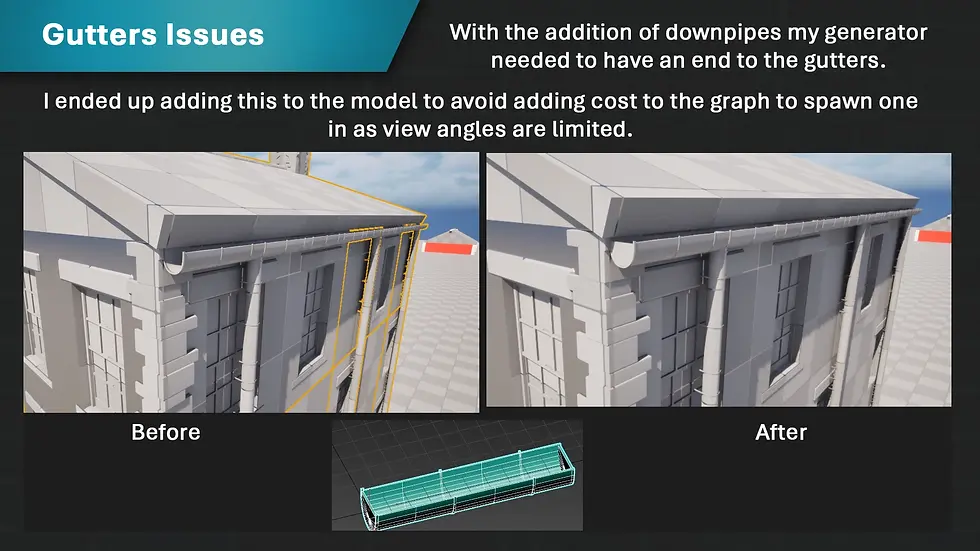
If I had more time, I would add some sort of stepping algorithm to allow the gutters to weave around on empty squares but figured as this is rare on most buildings I’ll leave it be.
Spawning Gables

Creating gables was quite challenging as I encountered a ton of issues not only passing the grammar across but spawning adjustable pieces. I ended up using a few “for each point loop” to adjust grammar or randomisation values and exposed the rest. For the gables themselves they are styled as half timber gables based on my stone research but lack the Tudor timber beams in the main building (the vertical ones). I am still debating if to allow spawning Tudor style buildings as it wouldn’t be too hard now that gutters respond well to gable spawning as the mask I can get from the front face allows me to get rid of other points. Everything is connected which is fantastic, so depending on complexity of the chimney/other issues that arise I may push the visuals a bit. Onwards!
Spawning Chimney

This was quite quick to make as the logic for grammar I’ve used basically everywhere however I did want an artist to have quick options to choose a direction to spawn elements from such as left and right of the rooftop. To accomplish this, I sorted the spawn points in X and grabbed the first and last positions. I also used a dropdown switch 0, 1 to allow VFX instancing for now I made a simple Niagara emitter with low opacity and gravity to act as a placeholder.
Materials and Custom Instanced Primitive Data

I finally have gotten round to adding materials to the surface and it makes the house generator look that much better! For a while I was quite worried with how bland it looked but now with some basecolor and roughness it pops that much more. It’s still quite debatably ugly however I will spend some time modelling and sculpting a proper kit out, so it has better data to work from. Onto the best part of todays work, the custom primitive data specifically instance based custom data. I was quite worried that when applying the typical custom primitive data attrib to my unreal point it wouldn’t translate across as the HDA output is an instanced static mesh component that combines everything. Luckily, I was very wrong, there s a fantastic node called per instance custom data that still allows some data to be stored which is useful for hue shifting and adjusting shaders from a generator level. I used this to drive moving my cubemaps across to offset them and changing their brightness. This is a big start to ensuring my master materials are better incorporated and utilise everything UE has to offer, onto stain decal spawning next before I tackle fixing proportions/material values.
Decal Spawning

To place the decals, I used the position data and orientation from the walls and gutters. I decided to try using the align and spawn methods to better place rooftop decals over the bent edge. However, after some feedback from my Limitbreak mentor Jon, I uncovered that it’s best to avoid decal overlap as much as I had done due to its DBuffer cost. I will keep the edge decals however will remove the overlaid ones and will focus instead on making a more efficient shader to create recolourable instances using per instance custom primitive data.
Building Generation

As part of a milestone, I wanted to test out how easily the kit could be used to make buildings and used the grammar to quickly place blocks to match my reference. My main feedback on this is I need more pieces including side pieces of half space to better buff out non square layouts. Additionally, the shaders themselves would benefit from being driven by more efficient methods possible colour gradients which I plan to explore for my rooftops. I need to also add more overlap volumes for easier artist control as grammar can be tedious to type and difficult to see where it starts counting (I could make a custom gizmo or the engine orientation?) I will investigate this further.
Final Shift in the Narrative, Mining Little Ashton

Its that time of the project where I change the narrative for the billionth time, first a cottage, then a book village and now a mining town. Now why a fictional mining town in 1960s Durham? Well, I got bit by the bug of storytelling by watching some great documentaries and movies that inspired me to really dig into the place as I felt it resonated strongly with a feeling of melancholy the mining community underwent around the 1960s up until 90s. I also felt that the village narrative with my favourite bookstores didn’t pose any real interest to the viewer as there wasn’t any narrative seeded there to begin with, it was just a scene with references. Back to mining to cut it real short there was a great deal of striking due to Thatcher’s government destroying a lot of jobs and closing a lot of pits as coal was being phased out. This really impacted these villages that relied on their local colliery to supply the entire village with jobs for the past over 100 years and maintain their communities. Generations of family split apart, robbed of their futures having to look for other avenues to sustain an income, with a lot of these villages being bulldozed after the colliery closed. This really resonated with me as someone who was told before going to university how great the games industry was to work in and how university was going to be full of opportunity to shape my future.
However, I was part of the unfortunate year that started university right as covid kicked off and I still feel it robbed me of a promised future that others had before. I did well in my degree despite all odds, but I didn’t know the classes names until the final year, we never really hung out and didn’t have any trips to bond over. I want Little Ashton to represent this tone shift, feeling of helplessness in a town divided by the miners strikes and recent pit closure. I have created 2 contrasting families to embody this conflict, the first the Trotters (classic mining household of 4 kids who also manage their local pit ponies) and the Elliots (mining family of 3 who folded to the rising cost and returned to work despite the aggressive picketing which led to them being discriminated and called “scabs”).
Research Craghead and Mining Books

To learn more about the time period and its people I read a variety of books on the topic and watched a bunch of documentaries, the most notable one being BBCs Archive “1969: Craghead Colliery | A Year in the Life”. This fantastic record live from the time period showcases a year in the town of Craghead as pit closure looms on the horizon and families are told to start packing their things or retire. In particular I really liked how it showcased Brians family holding out until the end, a young couple with 1 kid and another on the way facing having to look for different jobs to make ends meet. It really showcases a genuine account full of emotion of the town and all its different angles from work to social aspects of their community singing at the local town hall. Another notable person is George Hancock who worked the mines since he was 14 and is not being told to retire as it closes. But the community he has grown up with and even his dog, who unfortunately passes nearing the end of the documentary (rip Flossey) are all starting to disappear as the pit closes. The village of Craghead during the 1930s had 4,973 people living there, today after the pit closure over 50 years ago it has under a 1000 people.

In terms of books, I was fortunate to be near the Hive one week, a fantastic public library in Worcester with a plethora of books on the topic. I read “The collieries and coalminers of Staffordshire” by Stone, R. (2007) which taught me about the deplorable mining conditions these families faced over the years. Did you know that helmets only became mandatory in 1930? And that children as young as 7 used to work the mines until the legal age was raised slightly over the years. There were people opposing this raise too! An insane time capsule of accounts of the era, and how the families steadily improved. One thing that did not improve was the quality of housing as I read in Housing the workers 1850-1914 by Daunton, M.J. (2015). These cookie cutter accommodations were of low-quality build, repeatable and had only the essentials however considering the rent was discounted if not free miners would flock to them being highly skilled workers and would start families of an average of 4 children in these small 2 story houses.

However, this too ended up being a bargaining piece for the mine bosses during the strikes as families would risk losing their homes opposing their employers until the unions would step in. I ended up buying some books to better understand the layout of these workhouses alongside how Craghead had changed overtime by a direct photography account which was fantastic to read through. Many beautiful old Victorian buildings were bulldozed and replaced with more modern high street shops and one of which was a barber went through various changed of different shops until today it returned to being a barber. A great account photographed by a resident over the course of 60 years. I highly recommend picking up Stanley, South Moor & Craghead Through Time by Hindhaugh, R. (2013) and Workers’ housing in West Yorkshire, 1750-1920 by Caffyn, L. (1986) if you are ever at your local library to give them a read.
Now armed with the knowledge and inspiration of the stories of the time, its time to look into more adapted accounts of the miners strike to research how I could tell the story of my little village.
Research Billy Elliot (2000) and Pride (2014)

For more inspiration I watched Billy Elliot (2000) that really showed the struggle firsthand from the perspective of a family and kid growing up during the mining strike. I highly recommend you watch it, as I will spoil it a bit. My favourite moment in the movie was when the family hit a low point in terms of their savings, the father realised how good Billy was and that going to London to study would make this future. But they had no money, after striking for so long the father decided against it all, despite being very vocally against scabs and screaming at the mining buses surrounded by a cage like an animal, joined up to mine becoming a scab. This harrowing moment is the framed by the eldest seeing his dad in the bus and realising the reality of it all, that they are set on a losing battle losing hope by the day. I want to take the streets, its colourful design and the strong community that is framed through belongings to tell the story of the Elliots and the Trotters. In particular I want the Elliots to be scabs, however as the strike fails the Trotters will have no choice but to move and look for other mining work as a scab regardless, splitting the village forever.

Pride (2014) on the other hand shows solidarity in the battle of the picket line against a police state and brutality. As a queer person I find it rare especially in older media to find good depictions of queer folk that tell their stories and was astonished to find such a realistic account of a very real part of history. What I liked most was that at the end of the day, the lesbians and gays supporting the miners (LGSM) got support back when the miners helped fund pride events and attended in mass to support the parades in a time of few queer rights. From this movie I will be taking the newspapers as reference and try to subtle foreshadow it however as the story happened in South Wales, it’ll be a bit strange to see anymore about it in a Durham mining town. I choose Durham as, despite as much as I love Wales, I don’t know enough of the language to confidently depict signage and written work around the town in Welsh. Now onto the drafting the sequence and blocking out the town.
Planning Sequence and Drafting

During watching the Craghead documentary, there is a shot in the town hall where the village is gathered with good drinks, and some folks are singing despite the sad tone over the town with upcoming pit closure. The songs the gent sings are from The Sound of Music, predominantly the opening “The hills are alive with the sound of music”. As a big fan of musicals, this really stood out to me as the musical came out closely to theatres around the mining strikes and would be a hit due to its fantastic theatrical performances.

For my animated sequence I settled on “These are a few of my favourite things” as I felt the little props and assets I could work on would be tailored to each family. I used a template from online to begin drawing out framing and composition work based on the lyrics, I didn’t want the song to feel too long so I limited the shots to be simple moving in and out sweeping frames around 4-7 seconds each. This split the shot count into a neat 11 counting the 12th credits shot. I always prefer to sketch stuff out before blocking it out so here’s my further development in engine with blockout and level sequence.
I plan to add decals that are written using the same paint used on the mining strike signs, this will point the damage to the Elliots house as they are scabs to be from their once close knitted neighbours the Trotters.
Bibliography:
Billy Elliot (2000). Los Angeles: Universal Studios.
Caffyn, L. (1986) Workers’ housing in West Yorkshire, 1750-1920. London, : H.M.S.O.
Daunton, M.J. (2015) Housing the workers 1850-1914. London, : Bloomsbury Publishing.
Hindhaugh, R. (2013) Stanley, South Moor & Craghead Through Time. Stroud, : Amberley Publishing.
Houdley, M. (1969) 1969: Craghead Colliery | A Year in the Life | BBC Archive , YouTube. Available at: https://www.youtube.com/watch?v=iQyxIH1Px20 (Accessed: 30 July 2026).
Percival, J. (1966) YouTube. Available at: https://www.youtube.com/watch?v=kLQ9o3ZSEFQ (Accessed: 30 July 2026).
Pride [film] (2014). Culver City, CA: CBS Films.
Stone, R. (2007) The collieries and coalminers of Staffordshire. Chichester, West Sussex, England, : Phillimore.


Comments